Jump to main content
It looks like you are visiting from a different region. Select your country or region for location-specific content.
Go to Ireland
ASSA ABLOY
  • Career
  • Products & solutions
  • Stories
  • About us
  • Terms and conditions
  • Products & solutions
  • Stories
  • About us
  • Terms and conditions
    • Home
    • Products & solutions
    • Products
    • Digital Access Solutions
    • Wireless Solutions
    • SMARTair
    • SMARTair management
    • SMARTair i-programmer

    SMARTair i-programmer App

    • Access control
    • SMARTair

    The SMARTair i‑programmer App is the new, streamlined way to manage SMARTair devices, replacing the traditional portable programmer and solving many of its limitations. It brings all essential configuration and maintenance tools directly to your Android smartphone, streamlining every onsite task. With a modern interface, faster performance and greater flexibility, the i‑programmer helps installers and facility managers work more efficiently across every SMARTair installation.

    Smarter, faster, fully digital management

    • All tasks from a single smartphone. The i‑programmer allows you to initialise, configure and update SMARTair devices directly from your mobile phone.
    • A modern, sleek interface. Say goodbye to outdated, low‑resolution displays. The app delivers a new intuitive interface that makes every task clearer and faster.
    • Significantly faster performance. Improved communication speeds shorten every step of the process, helping teams complete installation and maintenance tasks in less time.

    What you can do with i-programmer:

    • Manage multiple installations. Switch between several sites stored on your smartphone and move easily between jobs without returning to the office.
    • More capacity for larger installations. With no limits on doors, users or matrix size, the i‑programmer scales effortlessly — ideal for both small facilities and complex, multi‑site deployments.
    • Instant status and health checks. Maintenance staff can view device status, battery levels and firmware versions at a glance — keeping the system running smoothly. 
    • Event collection and reporting. Collect and submit events directly through the app for easier system monitoring and record‑keeping.

    Flexible onsite work with fewer interruptions

    • Wireless file transfer. Send and receive configuration files using email, WhatsApp or OneDrive — reducing downtime and eliminating repeated trips to a PC.
    • Always up to date. Automatic app and firmware updates ensure your team always works with the latest features and security improvements.
    • Secure distribution. Access to the i‑programmer is protected through QR‑code activation and password control, ensuring safe, controlled management.
    • Multi-language support. The application is available in 13 languages, making it easy to adopt across diverse teams
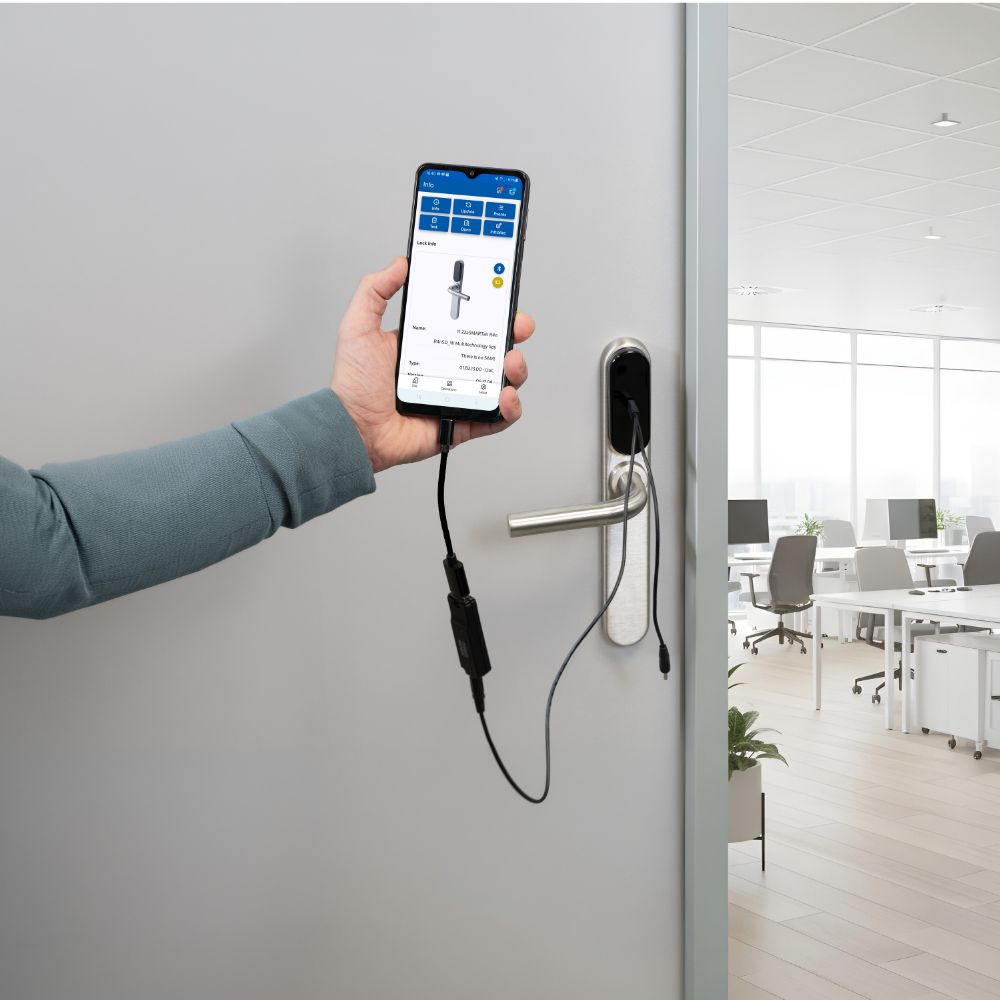


    i-programmer

    Faster, more intuitive and fully digital management with the new i-programmer App

    i-programmer

    1 of 4

    PC, Laptops and Tablets:
    • Compatibility with Windows 10/11 or macOS 12+.   
    • Supported browsers: Google Chrome (recommended) and Microsoft Edge. Not compatible with Safari, Samsung Internet, Firefox or Opera

    Mobile devices:

    • Compatibility with Android (not compatible with iOS devices)
    • Minimum requirements:
      • Android 8.0 for Google Chrome with Chrome version 138 or higher
      • Android 10.0 for Microsoft Edge with Edge version 140 or higher
    • Recommended RAM: 2 GB or more. Free storage: 30 MB min. Performance may vary on low end devices with limited RAM.
    • Connectivity: Internet access recommended for file downloads and updates.
    • Required permissions:
      • Storage access to read and store PC to Lock files
      • USB access for communication with SMARTair devices
    • Typical power consumption:
      • 14.7 mA in standby mode (App open or closed)
      • 19.0–23.0 mA during operation (initialization, updates, testing, event collection, etc.)

    Device connections

    • Compatible with all SMARTair devices
    • Device connection via PC-To-Lock cable and USB A to USB C adapter or direct connection with a USB C cable depending on the device (USB C cable not provided)

    Hardware compatibility

    • Compatible with SMARTair R3, R4, and R4n devices. (Not compatible with SMARTair devices older than R3, e.g. S6, S9.)

    TS1000 Software compatibility

    • Requires TS1000 version 08.04.02 or higher.
    • i-programmer functionality must be enabled in the TS1000 license (factory enabled or added via software upgrade).
    • Datasheet

    • AA_SMARTair_i-programmer_Datasheet_2026-06_AF(PDF, 166 KB)
    • Products & solutions
    • Stories
    • About us
    • Terms and conditions
    • Contact us
    • LinkedIn
    • Facebook
    • Instagram
    • YouTube
    • © ASSA ABLOY
    • Cookies
    • Legal
    • Privacy center
    • Whistleblowing
    ASSA ABLOY
    Experience a safer and more open world
    • Products & solutions
    • Products
    • Digital Access Solutions
    • Door Closers
    • Panic Escape Devices
    • Padlocks
    • Door Furniture
    • Black Series
    • Cylinders
    • Locksets
    • Mortice Locks
    • Nightlatches & Rimlocks
    • Door And Specialised Hardware
    • Sliding Door Gear
    • Entrance Systems
    • Solutions by topic
    • Digital Access Solutions
    • Door Closers
    • Entrance systems
    • BIM & specification
    • Planet drop-down seals
    • Master Key Systems Guide
    • Solutions for every industry
    • Education
    • Entertainment and public facilities
    • Finance and banking
    • Government and military
    • Healthcare
    • Hospitality
    • Industry and manufacturing
    • Office and enterprise
    • Residential
    • Retail
    • Multi-Residential
    • Government and military
    • Stories
    • About us
    • Terms and conditions